A comparison for creators
Mymind Alternatives for a Private Reference Library
mymind helped popularize private, algorithm-free collecting. If you want a local-first library on your Mac, prefer a one-time purchase over recurring subscriptions, or want your own notes at the center, here is how the alternatives compare.
We make Linger, a local-first inspiration library for macOS with one-time licenses ($39 Personal, $79 Lifetime). Download links and activation codes are expected by email October 8–15, 2026. Competitor details below reflect the linked official documentation reviewed on October 9, 2026; mymind’s live checkout price was not verified. Different tools serve different workflows; test your own reference routine before moving an existing collection.
THE MOTIVATION
Why designers look for a mymind alternative.
mymind demonstrated the value of a calm, private space without social vanity metrics, ads or public feeds. When comparing tools for your own work, consider these three trade-offs:
- Recurring subscription overhead: mymind offers monthly and annual subscriptions; features and prices depend on the plan. Check its official pricing page for the plan you need. For an inspiration library that you might consult intermittently across different project cycles, ongoing recurring fees can feel heavy over years.
- Cloud dependency vs. local ownership: mymind uses cloud services, but its official offline update describes an offline-first iOS app from version 4.0.0. Check offline coverage on the platform you use; local storage is not exclusive to Linger.
- Auto-tagging vs. personal memory: mymind automatically generates AI tags and objects. Automatic labels can help you retrieve content, but test whether your own notes and remembered details also remain useful—for example, the balance of typography or a specific paper texture.
THE SHORTLIST
Compare five tools by how you work.
| Tool | Best suited for | Storage & Privacy | Pricing Model |
|---|---|---|---|
| mymind | Effortless cross-device capture with automatic AI categorization | Cloud services with documented offline-first iOS support; private by default | Monthly or annual subscription; plan-dependent pricing |
| Linger | A local-first Mac library centered on your personal notes and remembered clues | Local-first on your Mac; managed local storage; core search works offline | One-time purchase ($39 Personal / $79 Lifetime); pay once, no subscriptions |
| Eagle | Deep design-asset management with multi-format support (fonts, 3D, audio) | Local file system library; Mac & Windows; user-managed sync | One-time purchase; published standard price $34.95; 30-day trial |
| Are.na | Connected research, visual discovery, and collaborative channel curation | Cloud-based; choice of open, closed, or private channels | Free tier with block limits; paid membership for unlimited blocks |
| PureRef | Arranging visual references on an infinite canvas directly beside active design apps | Local .pur scene files on your computer |
Personal use: choose an amount; commercial use requires a Small business or Business license |
A LOCAL-FIRST ROUTE
Linger: Keep the reason you saved it, on your own Mac.
Linger is designed for creators who want an intimate, durable aesthetic memory rather than an automated content dump. It is built around three core principles:
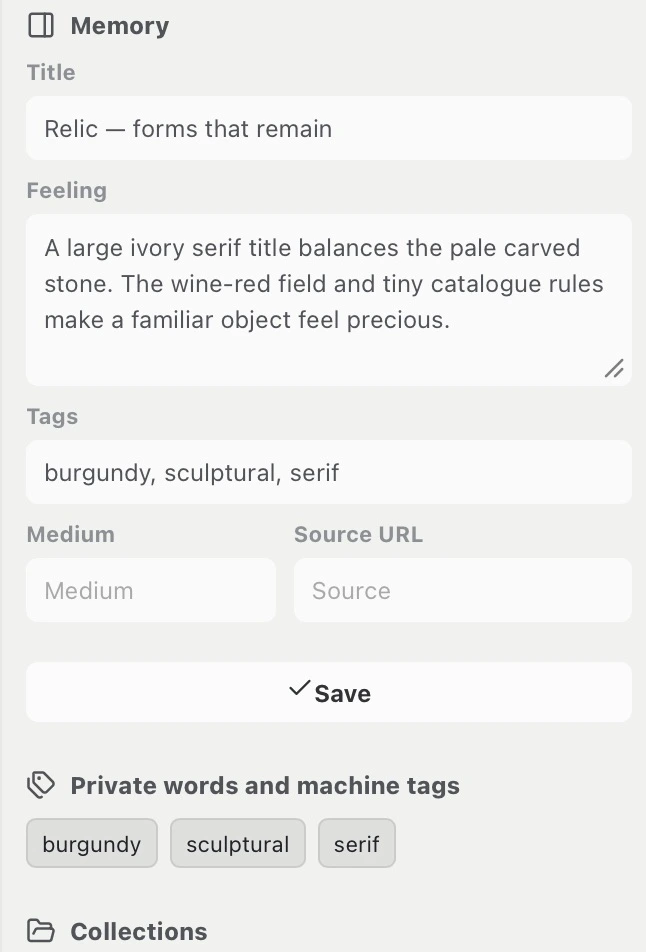
- In your own words: Instead of generic AI descriptions replacing your thoughts, Linger's Memory panel lets you capture the exact detail that caught your eye—a subtle typeface, an ivory background, or a feeling of quiet structure.
- Local-first privacy: Your files and SQLite database live on your Mac. You can browse, tag, search and organize entirely offline. External AI is completely optional and off by default.
- One-time ownership: Pay once ($39 for Personal, $79 for Lifetime) and keep your software permanently. No monthly bills to keep access to your own inspiration.
PRACTICAL CHECKS
Five checks before moving your reference collection.
Before committing to any new reference manager, test these five concrete requirements on a small batch of 10–20 saved items:
- Export fidelity: Check how easy it is to retrieve your data. mymind supports exporting images, PDFs, and a
cards.csvfile via desktop Chrome or Edge. Ensure you keep copies of your raw media before cancelling any service. - Context survival: When you bring an image into a new tool, does the original webpage link survive? Does your custom note stay attached? A gallery of uncredited images quickly loses its creative utility.
- Offline access: Disconnect your internet connection. Can you still open full-resolution images and search your library? If an organizer goes blank without Wi-Fi, it cannot serve as a reliable local archive.
- Search by remembered clues: Pick a reference you saved months ago. Try searching for a partial memory—a color, an author, or an associated mood. Test whether the tool surfaces the reference without requiring you to remember the original filename.
- Total cost over 3 years: Compare the actual subscription plan and billing cycle you need with a one-time license. Include optional upgrades and external model costs; Linger licenses do not include third-party AI usage.
COMMON QUESTIONS
Frequently asked questions
Can I export my saves out of mymind?
Yes. According to mymind's official export documentation, you can export your data using a supported desktop browser (Chrome or Edge). The export includes saved images, PDFs, and a cards.csv file containing note text, quotes, and bookmark URLs. mymind does not support direct re-importing. Linger does not provide an automated mymind importer. Keep your exported folder as a clean backup.
Does Linger require an internet connection or an AI subscription?
No. Linger runs locally on your Mac. Local-file import, personal notes, keyword recall, and library browsing work offline. Capturing web content requires access to its source. If you choose to connect an optional AI service, you bring your own API key; Linger does not charge a recurring subscription fee.
How does Linger differ from Eagle for Mac?
Eagle is a comprehensive digital asset manager built to organize massive collections of production files (including fonts, 3D assets, PDFs, and video clips) with heavy folder and tag hierarchies. Linger is focused specifically on aesthetic memory and creative references—helping you record why an image moved you and retrieving it when starting a new brief. See our detailed Eagle vs. Linger workflow comparison.
Is there an automatic Pinterest or mymind import in Linger?
Linger imports local image files and allows capturing webpages and excerpts via its browser extension. It does not offer an automated cloud-to-cloud sync from Pinterest or mymind. We recommend trying Linger with a fresh project or importing a curated selection of your most meaningful references.