A workflow comparison
Pinterest Alternatives for Designers by Workflow.
For discovery and connected research, start with Are.na. For a reusable asset library, compare Eagle, mymind and Linger. For a board you can reopen and export, look at PureRef.
We make Linger, currently available for pre-order. Competitor capabilities below are based on official documentation; our worked Linger example uses synthetic demo data.
START WITH THE JOB
What do you want to replace?
- Finding work you have not seen. Look for a discovery network. Are.na connects content through people and channels; Pinterest may still be useful for browsing while another tool holds your chosen references.
- Finding something you saved months ago. Look for source retention, useful notes, search and a library you can reuse across projects. Compare Eagle’s asset organization, mymind’s automatic organization, and Linger’s local library with your own words.
- Arranging a board for one brief. Look for saved layouts and a usable export. PureRef documents scene saving and image export. A long-term reference library and a finished project board can be different tools.
THE SHORTLIST
Five tools, different jobs.
| Tool | Job to consider it for | What to check before choosing |
|---|---|---|
| Are.na | Discovering and connecting research | Channel visibility, collaboration and export fit your workflow. |
| Eagle | A reusable design-asset library | Capture, tags, filters and your file formats. |
| mymind | Private saving with automatic organization | Search quality for your saves and the plan’s device/export coverage. |
| PureRef | A saved reference board beside your work | Reopening the scene and the exported image you need to deliver. |
| Linger | A local Mac library with personal notes | Pre-order timing; separate local libraries; optional model setup. |
Are.na: connected research and discovery.
Are.na’s official overview describes saving images, text, files and webpages into channels, then connecting existing content into new contexts. Channels can be open, closed or private; channel exports include PDF, ZIP and HTML. Consider it when discovering connections and sharing research matter. Check visibility before uploading private references. Its overview lists a free Guest tier and paid membership options. Official features and plans.
Eagle: a design-asset library.
Eagle documents browser capture, tags, filters, annotations and support for many design file formats. Its store lists a one-time license for two devices, with macOS and Windows support. Consider it if you need substantial asset organization as well as inspiration collecting. Test the specific formats, source links and searches you use. Official features · License and current price.
mymind: private saving with automatic organization.
mymind describes automatic organization, search by visual and textual clues, notes, article saving and Smart Spaces, with content synced across devices. Consider it when you want to spend less time manually filing each save. Check the plan you would use and test its search against your own references. Official product overview.
PureRef: the project board.
PureRef’s current handbook documents local .pur scenes, notes and groups. You can save a scene, reopen it, and export the canvas or selected images. Consider it for a working arrangement beside your design application or an image you need to deliver. Evaluate the board workflow separately from long-term library search. Saving and export · Notes and groups · Download and purchase options.
Linger: a local library with your own clues.
Linger keeps imported copies, personal reasons, tags and source information in a managed local library. Keyword Recall searches saved fields and can narrow by source, media and date. Saved queries become dynamic collections. Optional model tasks use your own API or an external agent through MCP and are off by default.
Linger is a pre-order for macOS, not an immediately available public download. The current offer is $29; the planned launch price is $39. One person can use the license on two Macs, each with its own local library. The current Canvas is temporary, and there is no built-in cloud sync or automatic Pinterest-board migration. If you need a shared team board, a saved deliverable, or an app you can download today, choose an available tool that covers that job. Offer, delivery and refund terms.
A SMALL WORKED EXAMPLE
Can you find the same reference for a second brief?
Use one task before committing to a tool: save a reference, keep the original page, note why it matters, find it again, and reuse it for another brief. For a board tool, also save, quit, reopen and export the arrangement.
- Choose a small set of images you can use, including one useful for both color and composition.
- Preserve the page link and add a note describing the detail you want to reuse.
- Search for a known clue. Then try a remembered word you never wrote down, and record both results.
- Reuse the reference in a second project without losing the original note or source.
- Check what leaves the tool: images alone, a board, or images with their context.
For our Linger example, cobalt returns four items in the 24-reference demo. nostalgic returns none until we add that clue to a note; then the matching item appears. This demonstrates the saved-text workflow, not automatic understanding of unwritten feelings.
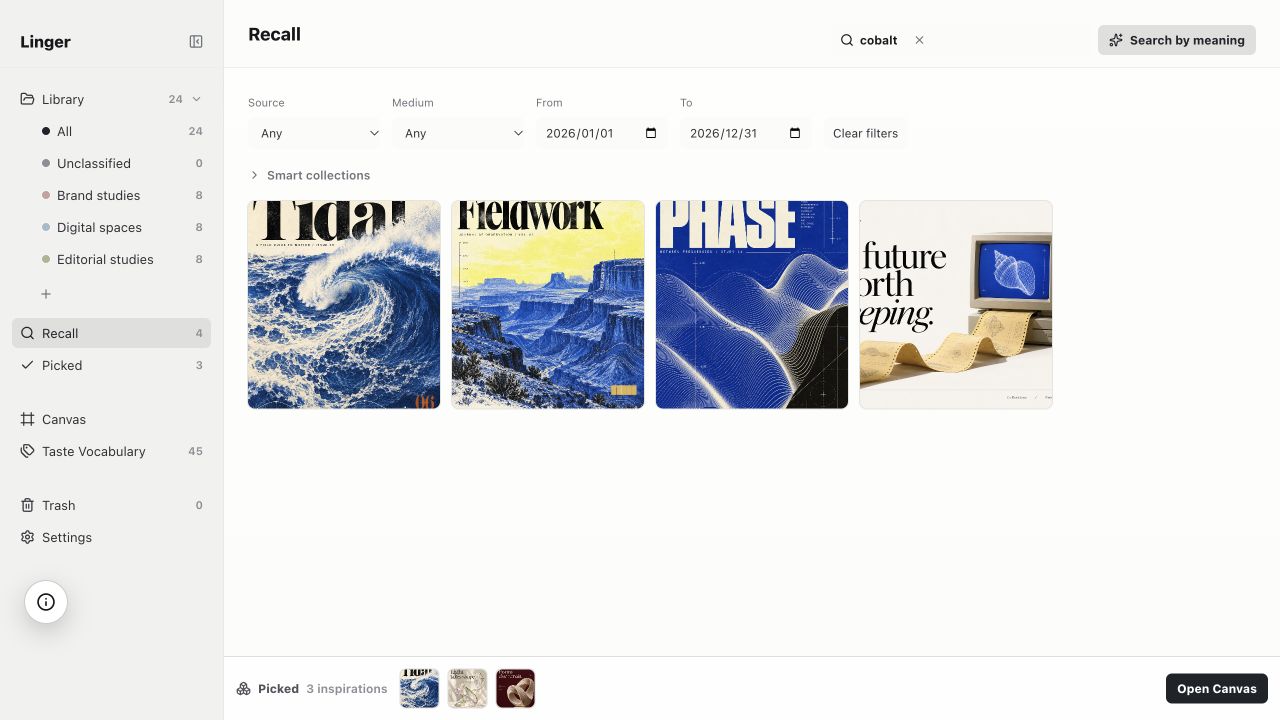
We have not run this task in the other four products. Their entries above are documented capability checks. Use the same images and questions in your own trial before deciding which workflow fits.
BEFORE YOU MOVE
Keep the source as well as the picture.
Pinterest’s official help explains downloading individual image Pins where that option is available; not every Pin can be downloaded. Saving a Pin to a Pinterest board and downloading its image are different actions. Pinterest’s download instructions.
Do not assume an image download carries its original webpage, creator, captions or board structure. Try a small migration first, preserve the Pin and original page links you know, and inspect the result in the destination. Linger currently imports local files and saves supported links; it does not automatically migrate Pinterest boards.
COMMON QUESTIONS
Choose for the way you work.
Which alternative is best for a private reference library?
Compare the workflow you want: Eagle for asset organization, mymind for its documented automatic organization and cross-device collection, or Linger for a local Mac library with personal notes. Linger is still a pre-order. Try your own source and retrieval task in any available candidate.
Which tool helps me discover new images?
Are.na documents discovery through people and connected channels. Pinterest can remain your discovery source while a separate tool stores the references you decide to keep. A local library does not need to replace the discovery feed.
Can I import my Pinterest boards?
There is no automatic board-import workflow in Linger. Pinterest documents individual image downloads where available. Check each destination’s official importer and test what happens to source links and notes before moving a large collection.
Which features work offline?
Linger’s local browsing, notes and keyword search use the local library; remote model calls and online sources require a connection. PureRef documents local scene files. For each tool, separately test local browsing, search, media, activation and export offline; cloud sync and an offline collection are different requirements.
Can I use Linger as a permanent mood board?
The current Canvas does not preserve its arrangement after you quit. For a board you must reopen or export, use a tool with a documented saved-scene workflow, such as PureRef.