 linger
On this page
We make Linger, a local-first reference library for Apple Silicon Macs. Linger is not a Milanote-style shared board — this guide says when to stay on Milanote and when another tool fits better.
The 2026 Quick Verdict: When to stay on Milanote and what to switch to
- Stay on Milanote if your work lives on shared boards (clients, comments, phone/Windows access) — its free plan has no time limit: 100 notes/images/links + 10 file uploads, with unlimited shared boards and real-time collaboration.
- Free board instead: Apple Freeform (Apple devices), Obsidian Canvas (local, free), PureRef (floating reference board), or capped free plans — Miro (3 editable boards), FigJam Starter (3 FigJam files), Are.na (200 blocks), xTiles.
- Private Mac library instead: Linger (Apple Silicon, macOS 11+, $39 / 2 Macs or $79 / 4 Macs one-time, 14-day trial, no built-in sync, no shared board), or Eagle / Muse.
Which job are you leaving Milanote for?
- Hitting the 100-card limit & wanting a free canvas: Compare free alternatives and real caps
- Live team whiteboards & client workshops: Best alternatives for shared team boards
- Working without an internet connection: Which Milanote alternatives work offline
- Keeping a private long-term reference library on your Mac: Milanote vs a private Mac library (Linger, Eagle, Muse)
- Visual research & connected notes: Milanote vs Miro, Notion and Obsidian
OVERVIEW & COMPARISON
Milanote and 10 alternatives compared.
Comparing Milanote with 10 alternatives across primary use, free tier limits, pricing, supported platforms, real-time collaboration, and offline availability. Prices in USD.Scroll sideways to compare columns →
| Tool | Best for | Free tier / limit | Price | Platforms | Real-time collaboration | Local / offline |
|---|---|---|---|---|---|---|
| Milanote | Persistent shareable project boards | 100 cards, 10 file uploads, images ≤10 MB; unlimited shared boards; no time limit | Pro $9.99/mo annual or $12.50 monthly; Team $49/mo annual (≤10) or $99/mo annual (≤50) | Web, Mac app, Windows PWA, iOS 16+, Android 13+ | Real-time, including on Free | Mobile: officially not yet. Desktop/web offline is official “Up next”, not shipped |
| Apple Freeform | Free Apple-ecosystem canvas | Core app free; no Milanote-style 100-card cap found; up to 100 collaborators | Included on supported Apple OS (iOS/iPadOS 16.2, macOS 13.1+); Creator Studio is a paid add-on, not required to collab | Mac, iPhone, iPad, Vision Pro; not Windows/Android | Real-time | iCloud sync; not a local-only library |
| Obsidian Canvas | Local notes vault + a canvas | Free without limits, no sign-up | App free (optional commercial licence $50/user/year); Sync $4/user/mo annual; Publish $8/site/mo annual | Local apps | Shared vaults / paid Sync — not a hosted board | Local files |
| PureRef | Floating on-top reference / mood board | Personal: try before you buy; no item cap stated | Personal PWYW (page suggested $7 / $15); Small business $49 one-time (≤3 users, this 2.x) | Windows 10+, macOS 10.14+, most Linux | Not a Milanote-style team canvas | Local |
| Miro | Team / facilitated whiteboards | 3 editable boards; 10 AI credits/mo; low-res export; no guests on Free | Starter $8/member/mo billed yearly; Business $20; Enterprise custom | Web + official apps | Real-time; Free invitees become members | Cloud |
| FigJam | Product-team whiteboard inside Figma | Starter: 3 FigJam files in one folder + unlimited drafts (drafts: view-only sharing) | Starter free; Professional Full $16/mo; Collab seat $3/mo (Professional) | Web; official iPad app mentioned | Real-time; 24-hour no-login invite sessions (product page) | Cloud |
| Are.na | Channels of connected blocks | Guest free forever, 200 blocks | Premium $7/mo or $70/year; Supporter $120/year (editorial: Supporter → Plus Plus $150/year from 2026-12-01) | Web + iOS/Android; browser extensions | Collaboration on channels, including Guest | Cloud |
| xTiles | Tile-based visual workspace (listicles call it Milanote-like) | Free: 3 personal spaces, 5 MB uploads, 1 shared space, 1,000 items / ≤3 members in personal spaces | Plus $12.42/user/mo annual; Pro $24.92/user/mo annual | Web-first | Real-time, including on Free (within caps) | Cloud |
| Linger | Private local Mac reference library | No free plan after trial. 14-day full trial, no card | $39 / 2 Macs or $79 / 4 Macs, one-time | Apple Silicon, macOS 11+ only; no official Windows / mobile / private web app | No official real-time board | Local library; collecting, notes, and text search work offline; no built-in sync |
| Eagle | Local design-file / visual-asset library | No free plan. 30-day full trial | US$34.95 one-time, 2 devices | macOS (Apple Silicon + Intel), Windows 10+ | No hosted team board | Local; any sync is user-configured |
| Muse | Native Mac visual bookmarks + a canvas | No ongoing free plan. 14-day full trial, no card | $29 one-time; up to 3 Macs | macOS 14+ Apple Silicon only; free iPhone/iPad companion | No Milanote-style multi-user board | Official: built-in features work with no connection; optional iCloud |
Prices and limits checked on vendor pages in November 2026.
FIT ASSESSMENT
Where Linger fits — and where it does not fit.
Milanote is a cloud workspace of persistent, shareable project boards — notes, images, tasks, and collaborators arranged on a canvas, on the web and on apps, with a free plan that caps how much you can add. Linger is a local Mac reference library — images, source links, and your own notes on an Apple Silicon Mac, with no built-in sync and no real-time shared board.
When Linger is a fit
Linger is a sensible choice when leaving Milanote if you actually wanted:
- A long-term reference library: saving images, original creator URLs, and your own observations to reuse across projects for years, rather than rebuilding moodboards for each client brief.
- Local Mac storage on Apple Silicon: keeping your library on your own Mac running macOS 11 or later, with core collecting, personal notes, and text search functioning offline.
- One-time desktop licensing: paying once ($39 for 2 Macs or $79 for 4 Macs) with a 14-day full trial and no card required, rather than an ongoing subscription.
- Private solo thinking: a quiet space where you do not need client review links, live cursors, or multi-user boards.
- Retrieval through your own words: finding saved images via saved-text search matching your notes and tags. Optional visual Recall is experimental, off by default, and requires a separately configured runtime.
Want to see how a local library works in practice? Jump to Linger on macOS screenshots ↓ or download the 14-day trial (macOS 11+, Apple Silicon).
When Linger is NOT a fit
Do not choose Linger if your work requires any of Milanote’s core capabilities:
- Real-time collaboration and sharing: multiple people editing one board simultaneously, comments, view-only links, or password-protected client presentations. Linger has no shared multi-user canvas.
- Web access and mobile devices: Milanote syncs across web, Mac, Windows (PWA), iOS, and Android. Linger has no Windows, iOS, or Android app, no private web library (the browser demo shows sample references only), and no built-in sync between Macs.
- A spatial project board as your main workspace: briefs, checklist cards, nested sub-boards, and column walls. Linger’s core is a reference library (with a session comparison canvas), not a campaign whiteboard.
- Windows, Intel Macs, or mobile as daily machines: Linger requires an Apple Silicon Mac (M-series) running macOS 11+. An Intel build is not currently offered.
- A free-forever plan: Milanote offers a permanent free tier with 100 cards and 10 file uploads. Linger has no free-forever plan; after its 14-day trial, a purchase is required to keep adding content.
- Facilitated workshops or structured docs: if you need enterprise whiteboarding at scale, choose Miro or FigJam; if you need structured databases and wikis, choose Notion.
TASK 1 · FREE TIERS
Is Milanote’s free plan enough for you?
Milanote offers a permanent free tier with no time limit, but its utility depends on how many items you add. The free plan includes 100 notes, images or links and 10 file uploads. Image uploads on Free are capped at 10 MB each (compared to 100 MB on Pro), while other files are capped at 50 MB each (compared to 5 GB on Pro). Milanote also limits background removals to 20 per month on Free, compared to 100 per month on Pro.
The decisive factor is how Milanote calculates capacity. Milanote allows unlimited shared boards and real-time collaboration on Free. Crucially, content that another user shares with you does not count against your 100-card limit. Furthermore, read-only board links can be viewed in any web browser without a Milanote login, with optional password protection. If you only create a single moodboard at a time, or if you primarily collaborate on boards created by paying clients, the free plan may last indefinitely.
Once you hit the 100-card threshold on your own boards, Milanote requires an upgrade to continue adding content. Professional plans cost $9.99 per month billed annually or $12.50 billed monthly for unlimited cards, file uploads, and storage. For studios, the Team plan costs $49 per month billed annually for up to 10 people, or $99 per month billed annually for up to 50 people. Teams larger than 50 must contact sales. Milanote does not publish a separate Pro trial length or a public "Business" tier price; its free plan acts as the ongoing evaluation environment for Pro features.
TASK 2 · FREE CANVASES
What is the best free Milanote alternative?
If you have outgrown Milanote’s 100-card cap and want a free visual board, available alternatives fall into three distinct models: genuinely free boards, capped free tiers, and free trials.
Genuinely free boards:
- Apple Freeform: Included free on macOS 13.1+, iOS 16.2+, and iPadOS 16.2+. It offers an expansive visual canvas supporting photos, PDFs, links, sketches, and sticky notes with up to 100 collaborators over iCloud. There is no Milanote-style 100-card cap. Apple Creator Studio is a paid add-on for premium assets and AI tools, but it is not required for canvas creation, editing, or real-time collaboration. It is restricted to the Apple ecosystem.
- Obsidian Canvas: Obsidian is free without limits for personal use, requiring no account registration. Its built-in Canvas tool lets you arrange Markdown notes, images, PDFs, and web links on an infinite local board. Data remains stored as local Markdown and JSON canvas files on your machine. Official multi-device sync is available through Obsidian Sync ($4/user/month billed annually).
- PureRef: The standard floating reference board for digital artists and illustrators on Windows, macOS, and Linux. The Personal download uses a pay-what-you-want model ("try before you buy" on the personal tier, with suggested amounts of $7 or $15). It provides a lightweight local canvas that can float above modeling or design software, with no item-count limits. PureRef is a local utility, not a multi-user hosted canvas.
Capped free plans:
- Miro Free: Provides an intelligent team canvas but restricts free accounts to 3 editable boards. Older boards automatically convert to read-only mode. Free accounts include 10 AI credits per month and low-resolution exports, but do not support external guest reviewers (all invitees become full team members).
- FigJam Starter: Included with Figma’s Starter plan. It permits 3 FigJam files in one shared folder, alongside unlimited personal drafts. Starter drafts support view-only sharing, and product boards include 24-hour no-login guest collaboration sessions.
- Are.na Guest: A community curation network organized into channels of connected blocks. The Guest plan is free forever up to 200 blocks, with full channel collaboration and data export included.
- xTiles Free: A tile-based workspace visually reminiscent of Milanote. The free plan permits 3 personal spaces, 1 shared space, up to 1,000 items and 3 members in personal spaces, and 5 MB file uploads.
Free trials, not free plans: several tools frequently cited in search results are commercial products with limited evaluation periods rather than permanent free plans. Linger offers a 14-day full desktop trial with no card required, requiring a one-time purchase ($39 for 2 Macs or $79 for 4 Macs) to continue adding references. Eagle offers a 30-day unrestricted trial ($34.95 one-time). Muse offers a 14-day full trial ($29 one-time). Heptabase provides a 7-day trial before requiring an annual subscription ($8.99/month).
TASK 3 · COMPARISONS
Milanote vs Miro, Notion and Obsidian
Searchers comparing Milanote often weigh it against three popular productivity tools. While listicles often group them together, each solves a fundamentally different workflow problem.
Milanote vs Miro: project boards vs team whiteboarding
Verdict: Choose Milanote for designer moodboards, creative pitches, and tactile visual briefs. Choose Miro for structured cross-functional workshops, sprint retrospectives, process flowcharts, and large-scale diagrams.
Milanote treats visual composition as its primary feature: cards snap cleanly, font sizing stays legible, and nested boards let art directors build navigable visual hierarchies. Miro functions as an enterprise whiteboard with infinite zoom, sticky-note clustering, voting plugins, and presentation timers. Miro’s free plan caps active collaboration at 3 editable boards, whereas Milanote’s free plan allows unlimited boards capped at 100 total cards.
Milanote vs Notion: visual canvas vs docs and databases
Verdict: Choose Milanote when your thinking starts with imagery, spatial arrangements, and moodboard direction. Choose Notion when your project requires structured documentation, relational databases, content calendars, and company wikis.
Milanote provides an unconstrained spatial board where images, swatches, and brief cards sit side by side. Notion is an editorial workspace built from linear blocks, pages, and tabular databases. While Notion supports visual gallery views and embeds, it does not offer a freeform spatial canvas. Many design studios draft initial aesthetic directions on a Milanote board, then track deliverable deadlines, client invoices, and copy specifications in Notion.
Milanote vs Obsidian: hosted collaboration vs a local notes vault
Verdict: Choose Milanote for real-time client collaboration, cloud access across browsers and mobile apps, and shared visual presentations. Choose Obsidian for a private, permanent notes vault stored as local files on your own computer with zero item limits.
Obsidian Canvas provides a visual interface for connecting notes, web clips, and images on an infinite board, but its core remains a personal Markdown notebook. It does not provide hosted web boards for client presentation. For users who want an open-source workspace blending linear docs with an infinite edgeless whiteboard, AFFiNE offers a free local-first alternative, while Heptabase ($8.99/month billed annually with a 7-day trial) and Scrintal (invite-based trial) focus on bi-directional card linking (neither provides a self-serve permanent free plan).
TASK 5 · OFFLINE ACCESS
Which Milanote alternatives work offline?
A frequent reason creators seek an alternative to Milanote is the requirement to access visual material without an internet connection—such as when traveling, on location shoots, or behind restrictive client network environments.
Milanote does not currently offer offline access; it is on its public roadmap. On mobile devices, Milanote’s official help documentation states that offline access is "Not yet" supported, requiring an active connection to view or edit boards. For desktop and web, Milanote’s public roadmap lists offline editing and read-only offline browsing under its "Up next" development category, but these capabilities have not yet shipped. If you lose network connectivity in Milanote, you cannot load boards or save new cards.
For creators who need reliable offline performance, local-first tools offer complete independence from network availability:
- Obsidian Canvas: Reads and writes local files directly from your hard drive. Both the core text vault and visual canvas operate 100% offline.
- PureRef: Runs as a standalone desktop utility on Windows, macOS, and Linux, saving references into a compact local
.purfile that requires no internet connection. - Eagle: Stores images, audio, video, and fonts in a local file library on your Mac or Windows computer, executing searches, filtering, and tag management offline.
- Muse: Developed by Theodore HQ as a native Mac application for macOS 14+ on Apple Silicon. Built-in visual bookmarking and canvas navigation work locally without network access.
- Linger: A private, local-first reference library for Apple Silicon Macs. Core collecting, personal observation notes, and saved-text search work offline. An internet connection is required only for initial account sign-in, licensing, and optional external AI connections.
TASK 6 · MAC LIBRARIES
Milanote vs a private Mac library (Linger, Eagle, Muse)
When evaluating alternatives to Milanote, many designers discover that they were using project boards for a job better handled by a dedicated reference library. Understanding the architectural difference between a project board and a reference library prevents choosing the wrong software.
A project board (such as Milanote) is ephemeral. You arrange a temporary set of images, swatches, and task cards for an active brief or client presentation. Once the campaign launches, the board is archived. When you start the next brief, you must search for references all over again.
A reference library (such as Linger, Eagle, or Muse) is persistent. It serves as a permanent, long-term archive for visual references, typography specimens, web links, and design details that you collect over years and reuse across dozens of different projects.
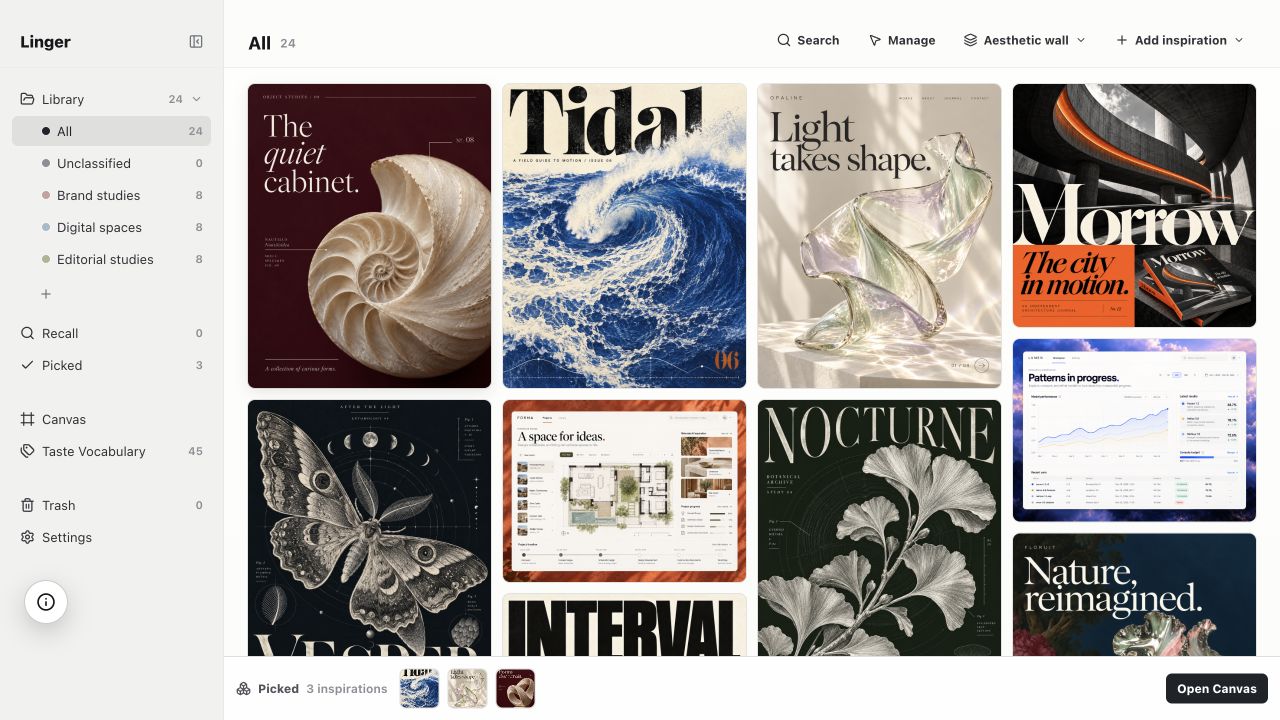
Linger on macOS: Linger is built specifically for designers on Apple Silicon Macs (M-series) running macOS 11 or later. An Intel build is not currently offered, and there are no official Windows, iOS, or Android apps; our browser demo shows sample references only, not a private web library. Linger operates on a one-time desktop license: $39 Personal (1 person, 2 Macs) or $79 Lifetime (1 person, 4 Macs), backed by a 14-day full desktop trial with no card required. There are no item-count limits on your library, and core collecting, notes, and text search work offline. Each Mac maintains its own local database and managed files; there is no built-in cloud sync.
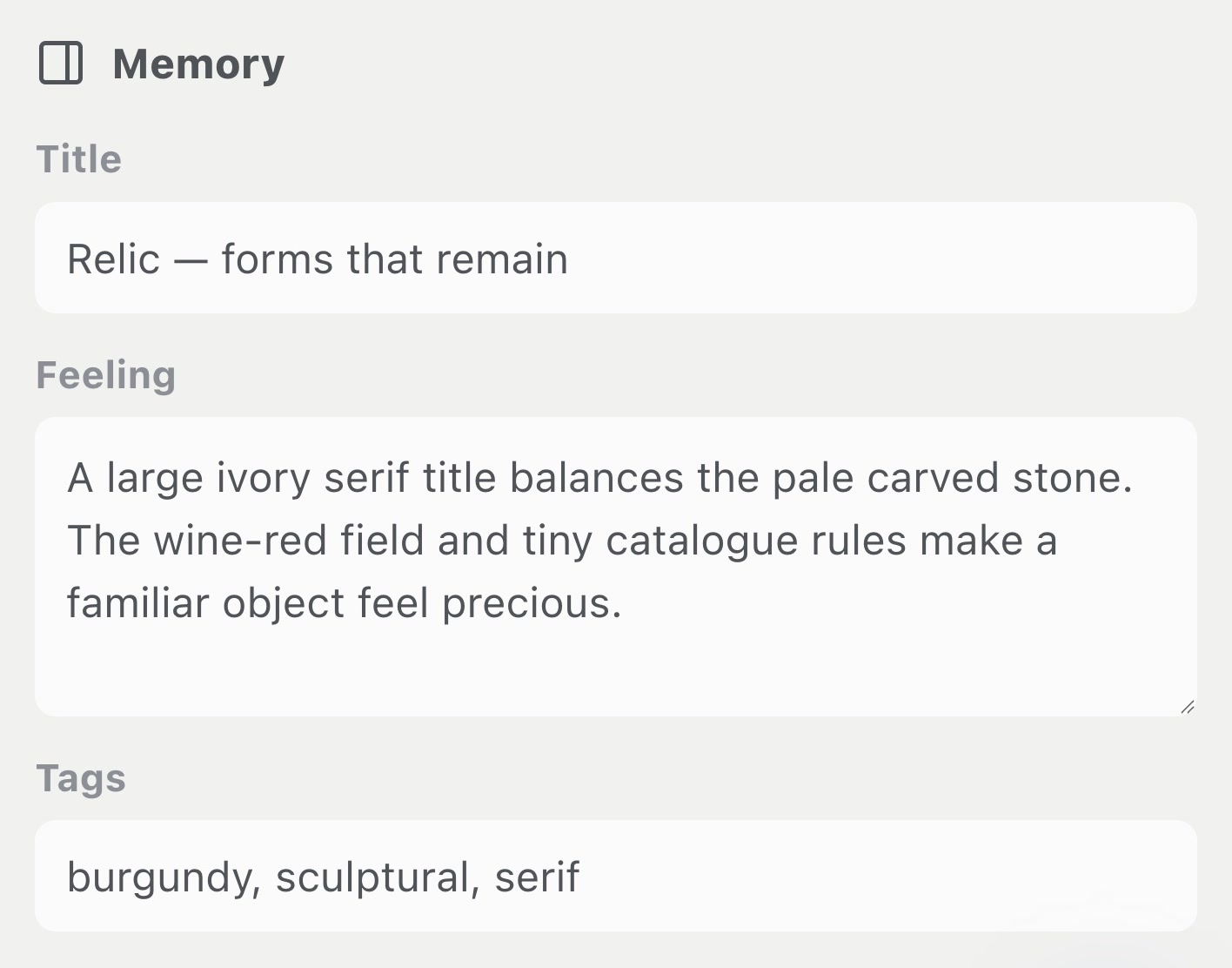
In Linger, you record personal observations in your own words (such as “understated editorial serif” or “matte ceramic glaze”) and retrieve them instantly using saved-text search. Visual Recall is optional, experimental, and off by default, requiring a separately configured runtime not bundled in the download.
Building a long-term reference archive on your Mac? Try Linger free for 14 days (macOS 11+ · Apple Silicon, no card required) — or buy once for $39 (2 Macs).
Other Mac reference tools:
- Eagle: Built for organizing large production asset libraries (3D files, audio, design files, fonts) across deep folder structures on macOS (Apple Silicon and Intel) and Windows. It costs US$34.95 for a two-device lifetime license with a 30-day trial. Learn more in our Eagle alternatives for Mac comparison.
- Muse: Built by Theodore HQ for macOS 14+ on Apple Silicon, offering visual bookmarking paired with a flexible canvas. It costs $29 one-time for up to 3 Macs and includes a free iPhone/iPad companion app with optional iCloud sync.
If your primary goal is an automated bookmark collection with AI tagging rather than a visual board or a local library, explore our mymind alternatives guide.
TASK 7 · HYBRID WORKFLOW
Can you use a library and a board together?
A reference library and a project board do not have to compete; in professional design workflows, they work best together as complementary tools.
Keep your reusable references in a permanent library (such as Linger, Eagle, or Muse). This archive retains the original high-resolution image files on disk, creator attribution, source URLs, and your personal notes over years. When a new brief begins, pull a focused selection of 10 to 20 images onto a project board (such as Milanote, Apple Freeform, or Miro) to assemble client moodboards, discuss layouts with collaborators, and collect feedback. When the project wraps, archive the board while your reference library continues serving your creative work. For more on structuring inspiration, read our organizing creative inspiration guide or our Pinterest alternatives for designers.
PRACTICAL MIGRATION
How to move your work out of Milanote
If you decide to leave Milanote, start by exporting your existing content using Milanote’s official export features:
- Export boards individually: Open a board, click the export icon in the upper toolbar, and choose your format: PDF Standard, PDF Large, PNG, Word document, Markdown, or plain text. Note that PDF and PNG exports are single-page documents, which can compress sprawling boards into small text.
- Generate a ZIP of files: Choose Generate ZIP from the export menu to download an archive containing all raw image files, videos, and document uploads attached to that board. For large boards, Milanote prepares the archive in the background and emails a download link.
- Work around the Home board restriction: Milanote’s official help center notes that the Home board cannot be exported directly. To export material from your Home board, create a new sub-board, select and move your content into that sub-board, and export from there.
- Understand import reality: No Milanote importer and no Eagle .library importer exist for Linger. Users export image files from Milanote and import them into Linger. Spatial card layouts, arrows, column structures, and linked checklist cards do not transfer automatically into any reference library.
- Advisory on sunset tools: Note that Kosmik announced its shutdown in April 2026 and wound down service on May 31, 2026; do not adopt it for new projects.
When moving references to your Mac, keep original creator pages and media links organized using the practices in our save images with source links guide and our image management software overview. You can also review setup steps in our getting started guide.
COMMON QUESTIONS
Frequently asked questions
Is there a free version of Milanote available?
Yes. Milanote provides a free plan with no time limit. It includes 100 notes, images, or links, along with 10 file uploads (up to 10 MB per image and 50 MB per file). Free accounts also include unlimited shared boards and real-time collaboration with invited editors.
Is Milanote free enough?
Milanote’s free tier is sufficient for individual moodboards or lightweight client presentations. Shared boards do not count toward a free collaborator’s 100-item allowance, and read-only links require no login. However, once you build ongoing project archives or hit 100 personal cards, you must upgrade to Pro or prune items.
Is obsidian better than Milanote?
Obsidian is better if you prioritize a local Markdown vault, offline ownership, and connected text notes with no item limits. Obsidian Canvas arranges notes and cards visually for free. Milanote is better if you need unconstrained visual drag-and-drop moodboards, cloud sync across devices, and instant multi-user client collaboration.
Is Milanote or Notion better?
Milanote is better for spatial creative boards, visual brainstorming, and loose moodboard layouts. Notion is better for structured documents, relational databases, sprint tracking, and company wikis. Many creative teams draft initial visual concepts and moodboards in Milanote, then manage delivery tasks and documentation in Notion.
Which is better, Milanote or Miro?
Milanote is better for designers and creative directors assembling curated moodboards, visual briefs, and aesthetic direction. Miro is better for cross-functional facilitation, sprint retrospectives, large diagramming, and structured workshops. Miro’s free plan allows three editable boards, whereas Milanote’s free tier limits total cards on unlimited boards.
Does Milanote work offline?
Milanote does not currently offer offline access; it is on its public roadmap. Milanote’s official mobile support states that offline access is not yet available, while offline editing and read-only offline browsing for desktop and web remain listed under "Up next" on its roadmap. You need an active connection to load and edit boards.