How to Save Images with Their Source Links
Save the original page beside the image, keep the media link separately, and mark what you cannot verify. A small source record works with your current files or collection tool.
Keep the page, the file and what you know.
When the page is still open, save its address before downloading the image. Keep a permitted local copy if you need one, then record the creator only when the page actually credits them. A media URL can reopen a picture without telling you who made it or what project it belongs to.
- You have the project page: record that page and the media URL separately, with the credited creator and the date you saved it.
- You only have an image-host or CDN link: keep that exact link, but mark the original page and creator as unknown until you can verify them.
- You have a local or generated file: record its origin from what you actually know. “No original webpage” is a valid answer.
A saved link is not a permanent webpage archive. It also does not give you permission to reuse the image. Keep known use conditions or a link to them; if they are unclear, write “unknown.”
A small record you can keep beside the image.
Use this in a text file or a note in your current tool. Download the blank record and three filled examples. It is a plain-text worksheet, not a Linger import format.
Title:
Original page: URL / unknown / no original webpage
Media URL: URL / unknown / local file
Confirmed creator: name and evidence / unknown
Saved on: YYYY-MM-DD
Use conditions: terms link or note / unknown
Why I saved it:
Last source check: date and result
Use a filename that connects the note to the file, such as reference-017.png and reference-017-source.md. Avoid putting private account tokens or personal sharing links into a record you will publish.
Three inputs, three honest records.
These examples use our public Linger demo material. They show how the information you possess changes the record. They are not three browser-extension capture tests.
A. You have a page that explains the image.
For the Memory-panel screenshot in our reference guide, keep both the explanatory page and the image file. The page gives the screenshot context; the image link opens only the pixels.
- Title
- Linger Memory panel — Relic demo
- Original page
- Relic reference walkthrough
- Media URL
- notes-panel.jpg — full-size screenshot
- Confirmed creator
- Linger publishes this product screenshot. The artwork and record inside it are synthetic demo material.
- Saved on
- 2026-10-03 — example record date
- Use conditions
- No third-party reuse license asserted by this example.
- Why I saved it
- To see how a saved reason stays beside a reference.
B. You have only a direct image link.
Suppose your input is just the Relic image file, without the page that explains it. Record the link you have. The hosting domain alone does not establish the artwork’s original creator or usage terms. The same rule applies to a CDN address.

- Title
- Wine-red poster with a pale sculptural form — descriptive title
- Original page
- Unknown from this input
- Media URL
https://withlinger.com/assets/product-demo/relic.png- Confirmed creator
- Unknown from this input; withlinger.com is the observed host.
- Saved on
- 2026-10-03 — example record date
- Use conditions
- Unknown
- Why I saved it
- The contrast between the wine-red field and pale form.
Here, the linked walkthrough supplies the missing provenance: Relic is generated demo artwork. In another collection, you may not find equivalent evidence. Keep “unknown” until you do; do not turn a filename or an image-search guess into a credit.
C. You know the file was generated for your demo.
For our original local Relic file, there was no external project page to preserve at creation. Our own production record provides its origin. Publishing it later creates a hosting page, not a previously unknown external creator.
- Title
- Relic — forms that remain
- Original page
- No original external webpage; generated for the Linger demo.
- Media URL
- Local file
relic.png; a public copy is linked above. - Confirmed creator
- AI-generated demonstration artwork prepared for Linger; not a historical artwork or a client project.
- Saved on
- 2026-10-03 — example record date, not a claim about creation time
- Use conditions
- Used in Linger’s authorized demo. No public-domain status asserted.
- Why I saved it
- To study the relationship between the pale form, serif title and wine-red field.
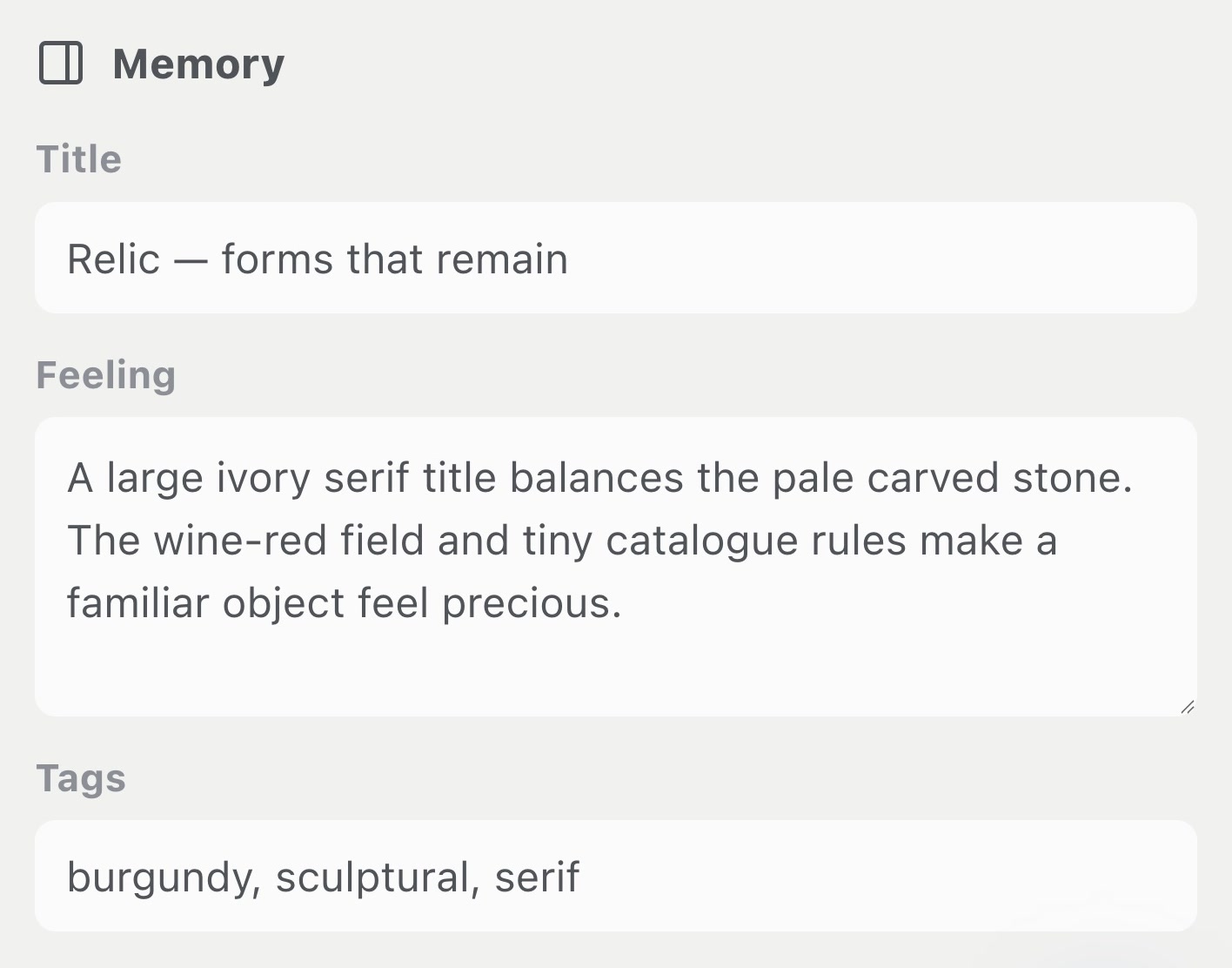
How these fields map to Linger.
Linger is currently a macOS pre-order. The following describes its 0.2.0 development source checked October 3, 2026; this article did not test extension installation or a desktop save-and-reopen cycle.
In Memory, an item has Title, Feeling, Tags and Source URL, followed by Save. For a local image with a known original page, you can put that page in Source URL and keep the remaining provenance in the Feeling note or the separate worksheet. A file import does not reconstruct an unknown source.
Supported browser media capture sends the current page and media address separately. The details panel prefers the recorded page for Open source page and shows Media URL separately when a page was recorded. A page containing an embedded image may itself be a repost; neither field automatically verifies the creator.
The editable Memory Source URL maps to the media/source field, while the captured page is stored separately. Editing that field is not a way to replace a captured page. Keep a correction in your note or worksheet and inspect which destination Open source page actually opens.
Keyword Recall reads both stored URL fields. Our source-field function check uses three synthetic records: a page-domain query finds the record with that page, a media-domain query finds the two records containing that media host, and neither finds the record with no source. This checks stored text matching, not web provenance or reverse-image search.
Reopen the source before relying on it.
- Open the saved page. Does it still show the work and the credit you recorded? If it redirects to a home page, login or unrelated content, note that result rather than calling the source verified.
- Open the saved file separately. A working page link does not prove you retained the image. A local screenshot may preserve appearance while losing captions, links and motion.
- Compare the record with the page. Confirm the creator and conditions from the page or another attributable source. Keep hosting site, publisher and creator distinct.
- Record gaps. If a link has expired, retain its address and last check date. Search your browser history or project notes for the original page. If you cannot verify it, leave the field unknown and choose a reference with clear provenance for a deliverable that requires it.
Eagle’s official capture walkthrough distinguishes browser captures with a source URL from captures made outside the browser. Raindrop’s official quickstart describes saving links into a bookmark collection. Choose a route that preserves the context you need, then check the resulting record; we did not repeat either vendor’s workflow here.
Method and corrections.
We make Linger. This guide combines a source-code review, the small keyword-function check linked above, existing screenshots of a synthetic library and a plain-text record you can reuse. The three records are worked examples; their saved dates are example dates. They are not claims that three captures or a migration were completed in the desktop app.
The check does not establish that a website allows downloading, that a source stays online, that image content identifies its author, or that a saved URL grants reuse rights. We did not test model analysis, extension setup or archive restoration.
Send a correction with this page URL and a public source for the change. For organizing and retrieving the rest of a collection, continue with the complete design-reference walkthrough.