From collecting to creating
The Bookmark Graveyard: How to Make Saved References Useful Again
You remember the feeling of a reference, but not its title. Or you remember it after the project is finished. A useful collection needs a way back from both.
Start with the work in front of you. Describe what you need, look through what you have already saved, and bring one useful reference into the project with its source intact. Better search helps you recover a half-remembered image. A place for references in your working routine helps you remember to look at all.
Another place to save things is easy to find.
In a discussion on r/BookmarkManagers, one reader asked whether anything was worth switching to after years with Raindrop. In the same thread, another described a familiar cycle: a new app promises to solve the “graveyard” problem, then becomes another collection people never revisit. Read the switching question.
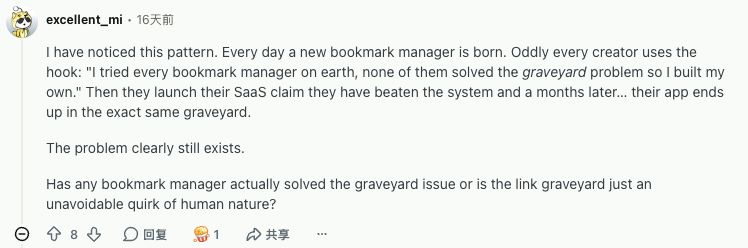
The frustration is recognizable: saving gives you somewhere to put a reference, but it does not give that reference a role in your next project. Adding more folders can leave you with a carefully organized collection you still do not use.
That does not make every unused bookmark a failure. Some references can wait for years; others stop being relevant. The useful question is narrower: when a reference could help, what keeps it out of reach?
“I can’t find it” and “I didn’t think to look” need different help.
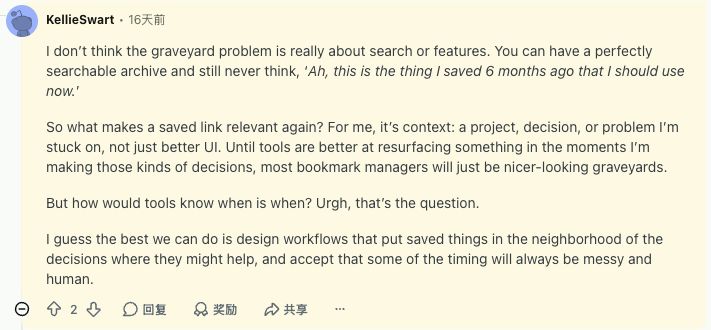
KellieSwart’s reply makes the distinction: a searchable archive can still sit outside the moments when you make decisions. A project, an unresolved question or a choice between directions gives an old reference a reason to return.
| What happens | What would help | What to test |
|---|---|---|
| You remember a warm, spacious layout, but not its title. | Search that can work from remembered details, plus visual browsing. | Can a description lead you back to the actual record? |
| You start designing without opening your collection. | A reference check inside the project routine or AI conversation you already use. | Does a saved reference enter the decision before you finish? |
AI search addresses part of the first gap. A connection to your working tools can reduce the second. Neither guarantees that a suggestion is useful. You still need to see the reference and decide what, if anything, to take from it.
Start with one project, not your entire archive.
Suppose you are laying out a small printed journal. You want the opening spread to feel warm and spacious. You vaguely remember saving something with the right atmosphere.
Use this as an exercise with your current collection. The prompts below are examples to adapt, not recorded Linger search results.
1. Describe the part you remember.
Write the visual clues before trying to guess the filename. Subject, color, composition, approximate date and the reason you saved it can each give you a way in.
An old-magazine feeling, warm colors, and lots of empty space around a small image.
If your tool supports meaning-based search, try that description. With keyword search, try shorter clues such as “magazine” or a note you remember writing, then browse the results. If nothing appears, widen one constraint at a time. A failed exact-word search does not tell you whether the image is in the library.
2. Add the decision you are making.
Now give the reference a job. “Warm and spacious” is a feeling; choosing a layout for the opening spread is a decision.
I’m designing the opening spread of a small printed journal. From my saved references, find up to three that could help me balance a small image with generous space. Keep the original sources beside each suggestion.
You can use this brief while browsing manually. If an AI assistant has access to your collection, it also gives the assistant a bounded request: search your saved material for this particular use.
3. Open the reference before accepting the explanation.
Check the image, the source and your original note. A warm palette may fit while the composition does not. A model’s explanation can sound plausible even when the reference is a poor match.
Keep the useful part specific: “The small image leaves room for a long title,” for example. Put that observation and the reference into your project notes. If none fits, keep looking; filling three slots is not the goal.
4. Make one choice you can point to.
Try a smaller image on the spread, change the spacing, or reject the direction after comparing it with the brief. A reference has done useful work when it helps you make a choice—even when that choice is to go another way.
Where Linger fits: your references, close to the work.
Linger is a local-first library for the images, notes and details that catch your eye. Its focus is creative memory: keeping a reference alongside where it came from and what mattered to you.
The AI-assisted workflow we are developing builds on that record. You should be able to start with an incomplete memory, inspect the candidates, and bring relevant saved material into a conversation about your current project. Connecting your own AI assistant through MCP provides a route into the library; your project request supplies the context.
This is not a claim that AI access alone solves the problem. In the Reddit thread, another builder already describes using MCP to let an agent read saved material, and a reply points out that AI-capable bookmark managers still face the same issue. The test is what you can recover and use.
Quiet background work should leave you in control.
The useful background job is preparing clues so you have less manual describing to do later. It does not require an assistant to watch everything you do or guess which project you are working on.
In Linger’s current AI setup, model processing is optional and off by default. You choose your own compatible API or an external agent through MCP. With the API route, the open desktop app processes queued tasks. With MCP, an external agent must actually run them; connecting it does not start an always-on assistant.
Keep your own words separate from machine-generated descriptions. “I saved this because the spacing feels calm” is your observation. A model’s list of objects or suggested tags is another kind of clue, useful to inspect and correct.
Your library being local does not make every AI request local. Content sent for analysis is handled by the model provider or agent you choose. Check that connection before enabling it. You can still use saved notes and ordinary search without model processing.
Judge the collection by one useful return.
Before moving thousands of bookmarks to a new app, try one reference you already know and one current project. Ask:
- Could I find it using what I actually remembered?
- Could I open the original record and check the source?
- Did it help with a specific choice in the project?
- Was the process easy enough that I would use it again?
A tool can help you recover and compare things. Giving those things a place in your work makes the collection worth returning to.
Exploring Linger? Check its current availability and delivery details.